
homelab: What runs in my homelab
- Smart home
- Documents & notes
- Own & infra
Tap a unit or a name and I'll tell you what it is.Hover over a unit or click a name and I'll tell you what it is.
Home Assistant
Smart home
What it does The heart of my smart home. Ties together lights, sensors and gadgets from all sorts of brands, locally and without the cloud.
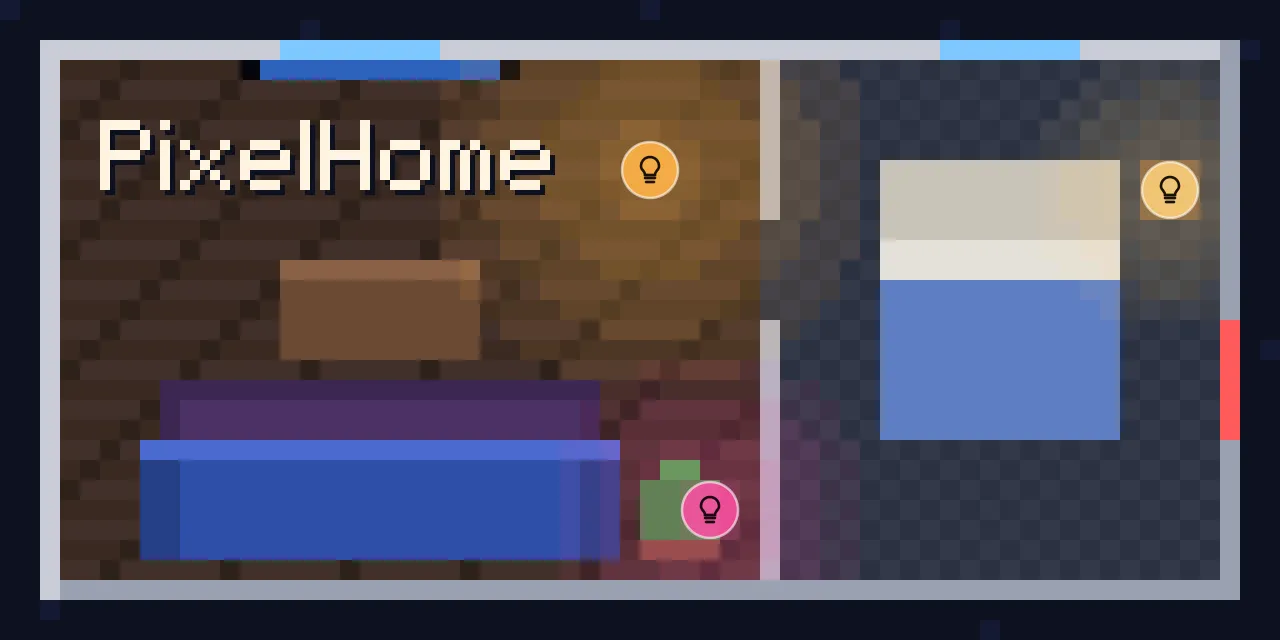
How I use it Runs 16 lights over Matter and Thread, plus scenes and reminders. For the tablet and the TV I built a floor plan in pixel-art style.
Frigate
Smart home
What it does Camera recording with object detection, fully local.
How I use it Records the doorbell and an outdoor camera, spots people and cars and only tells Home Assistant about stuff that matters. Runs on the Intel graphics in a mini PC.
Scrypted
Smart home
What it does Gets cameras into Apple Home that Apple doesn't actually support.
How I use it Turns my doorbell into a HomeKit doorbell. When someone rings, it pops up on my iPhone and Apple TV, I can talk back, and recordings go to iCloud encrypted.
Paperless
Documents & notes
What it does My document archive with text recognition and search. Scan your paperwork once and never dig for it again.
How I use it Over 1,400 invoices, contracts and letters. Mail attachments come in on their own.
Obsidian
Documents & notes
What it does My notes as plain text files, the same on every device. Behind it sits a small sync server at my place.
How I use it Mac, PC and iPhone sync end-to-end encrypted. The server in the homelab keeps every change for a year, and my homelab docs live in there too.
Dashboard
Own & infra
What it does My own live dashboard for the whole homelab.
How I use it Shows me load, backups, services and whether something is down somewhere. There's even a VR version for the Meta Quest where you can walk through the homelab.
Domus
Own & infra
What it does My own household app, in the browser and on the iPhone.
How I use it Shared costs and budget, maintenance dates and what's in the fridge, with a barcode scanner and recipe ideas.
Caddy
Own & infra
What it does Reverse proxy that handles HTTPS on its own.
How I use it Everything in the homelab with a web interface goes through Caddy. It gets its own certificates, and the important pages also need two-factor.
Backups & UPS
Own & infra
What it does So nothing gets lost, even when the power goes out.
How I use it Every night everything gets backed up to the NAS and, encrypted, to the cloud. If the power goes out, everything shuts down step by step and comes back up afterwards.
Tim Schaller
IT admin · Homelab · AI · Vibe Coding · Automation
By day I look after Microsoft 365 and Windows at an IT service provider. After work I tinker with my homelab, a Proxmox cluster spread over several machines, with my apartment, most of which Home Assistant runs, and with small tools that sometimes even do something useful. Anything I have to do by hand twice, I automate the third time. Some call that lazy – I call it efficient.
Projects
How my projects come about
The idea – me
Almost always something that bugs me day to day. An app that installs way too much. Some info I keep having to look up. Or something that just doesn’t exist yet.
The code – AI
I explain what it should do. The AI writes the code.
Testing & decisions – me
I use it myself, on my own hardware. Whatever breaks goes back as feedback, and in the end I decide what stays. This website was made the same way.
What I work with
Work
Microsoft 365 and Entra ID, Conditional Access, Exchange Online, Hybrid identity, YubiKey, FIDO2 and PKI, Windows Server and Active Directory.
Homelab
Proxmox VE, UniFi, Home Assistant.
Maker
Vibe coding, 3D printing, Connecting the digital and the physical world.
Get in touch
Got a question about a project, or just curious about something? Write me.