
RingMouse
The Actions Ring from Logi Options+ as a small standalone Windows app – with battery level, DPI, button assignments and per-app profiles. No driver, no telemetry, no network access.
- Language
- C#
- Version
- v1.1.1
- Updated
Built with Claude CodeIdea, requirements and testing: me. Code: Claude.
RingMouse.exe · 63 MB · 4 Oct 2026 · All files (6) ↗
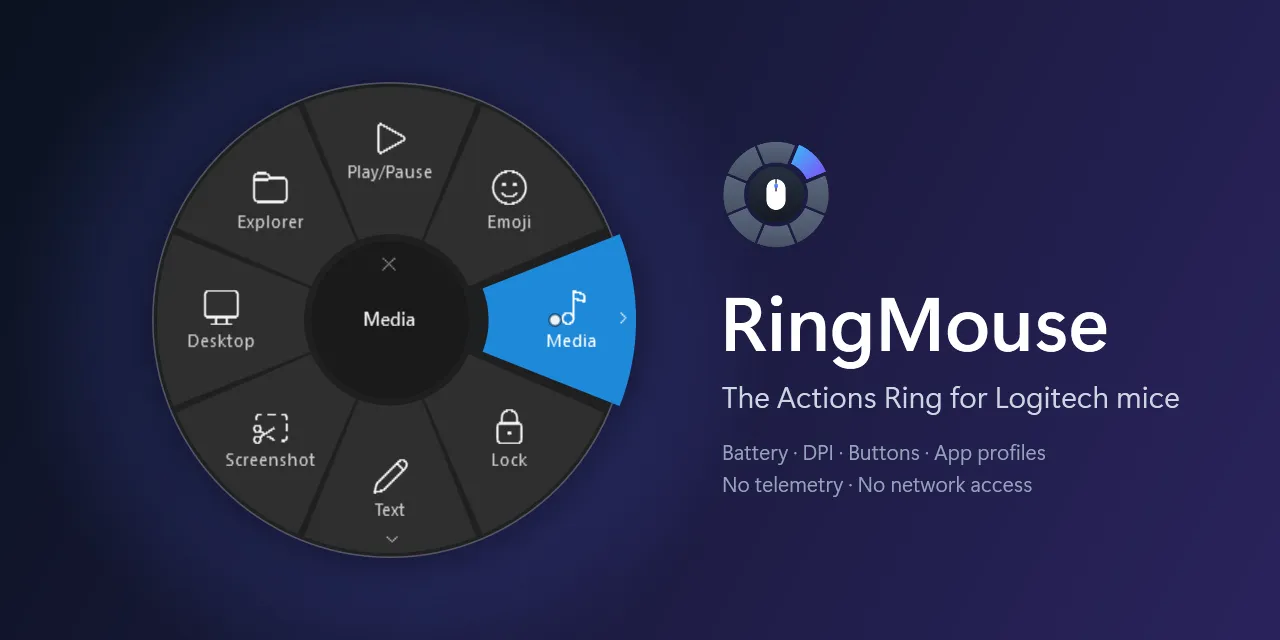
Logi Options+ has one feature I genuinely use every day: the Actions Ring. Press a button on the mouse and a ring of shortcuts opens right where the pointer is – media controls, emoji panel, a screenshot, a program. Flick in a direction, let go, done.
To get that one feature, though, Options+ installs agents, a plugin service and a lot of software I don’t need – and it switches the mouse’s per-click analytics reporting back on. RingMouse started with a simple question: how small can this feature be?
What it does
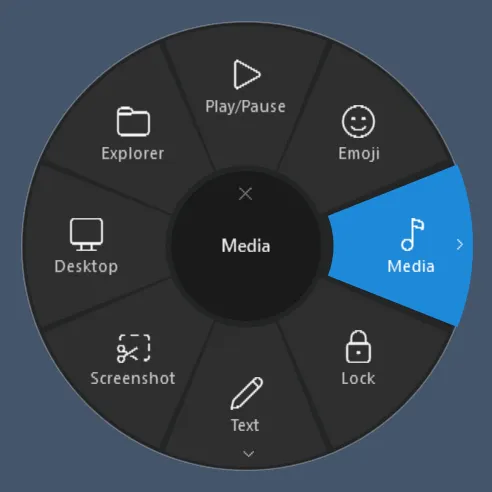
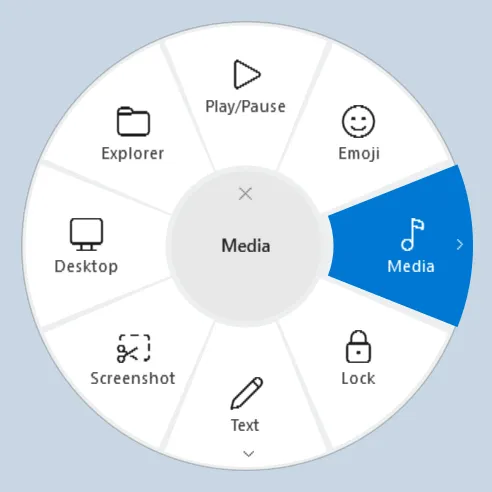
- The ring: tap to keep it open, or hold, aim and release. Submenus open when you push through a segment while still holding the button. It follows the Windows theme and accent color; size, colors and opacity are adjustable.
- Everything around it: battery level in the tray with warnings at 20, 10 and 5 %, DPI, assignments for the other buttons and per-app profiles that only override what you tell them to.
- Switching is painless: RingMouse imports your existing Actions Ring, button assignments and app profiles straight from Logi Options+.
- One file: a single self-contained
.exe. No driver, no admin rights, no telemetry and no network connections – everything stays on your computer.
Under the hood
RingMouse talks HID++ 2.0 directly to the mouse – over Bluetooth LE, a USB cable or a Bolt/Unifying receiver. Which buttons can be diverted is always asked from the device itself; nothing is hard-coded. Bluetooth mice like to forget things after standby or a reconnect, so RingMouse re-applies its button diversions after every reconnect, standby and unlock, and a watchdog checks every 30 seconds that nothing got lost.
From the button press to the first visible frame of the ring it takes about 24 ms. Built with .NET 10 and WPF, tested with an MX Vertical – other Logitech mice with HID++ 2.0 should work, and feedback is welcome.
// Changelog
RingMouse v1.1.1
Changes
- New logo and app icon (taskbar, Explorer, settings window).
- The file description of
RingMouse.exenow calls RingMouse what it is: an alternative to the Actions Ring of Logi Options+ – not a replacement for Options+ as a whole. - No functional changes compared to v1.1.0.
Downloads
File What it is RingMouse.exeThe app – a single self-contained file, no installation and no .NET needed RingMouse-uiAccess.zipOptional variant that may also operate windows running with admin rights (see the README) ringmouse-probe.exeDiagnostic tool for bug reports SHA256SUMS.txtSHA-256 checksums of all files Updating: quit RingMouse (tray → Exit), replace
RingMouse.exe, start it again. The exe is not code-signed, so Windows SmartScreen may warn on the first start: More info → Run anyway.
Deutsch: Neues Logo und App-Icon; die Dateibeschreibung der Exe nennt RingMouse jetzt eine Alternative zum Actions Ring von Logi Options+ statt eines Ersatzes für Options+. Keine funktionalen Änderungen gegenüber v1.1.0.
RingMouse v1.1.0
New
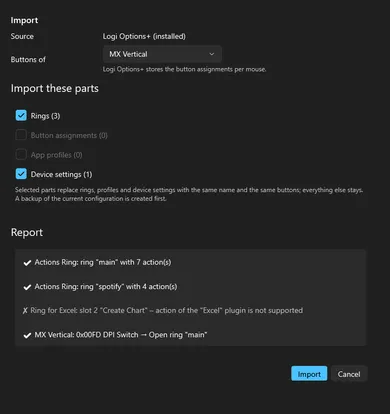
- Import from Logi Options+: takes over the Actions Ring with its folders, the button assignments and the app profiles of an installed Options+ – in the first-run setup or under Settings → General. A preview shows what is taken over and what not (e.g. actions of the Excel or Teams plugins); you choose the parts.
- Export and import of the RingMouse configuration (e.g. for another computer), including Actions Ring presets
exported from Options+ (
.lp5). A backup is created before every import. RingMouse.exe --import-report <file>shows what an Options+ import would produce, without changing anything.
Downloads
File What it is RingMouse.exeThe app – a single self-contained file, no installation and no .NET needed RingMouse-uiAccess.zipOptional variant that may also operate windows running with admin rights (see the README) ringmouse-probe.exeDiagnostic tool for bug reports SHA256SUMS.txtSHA-256 checksums of all files Updating: quit RingMouse (tray → Exit), replace
RingMouse.exe, start it again. The exe is not code-signed, so Windows SmartScreen may warn on the first start: More info → Run anyway.
Deutsch: Neu ist der Import aus Logi Options+ (Actions Ring samt Ordnern, Tastenbelegungen und App-Profile – in der Ersteinrichtung oder unter Einstellungen → Allgemein) sowie Export und Import der RingMouse-Konfiguration, auch von aus Options+ exportierten Ring-Presets (
.lp5). Vor jedem Import wird eine Sicherung angelegt. Details im deutschen README.RingMouse v1.0.0
First public release of RingMouse – the Actions Ring of Logi Options+ as a small standalone app for Windows, plus the mouse functions that go with it: battery level in the tray, DPI, button assignments and per-app profiles for Logitech mice. It covers only these mouse functions, not the rest of Options+. No telemetry, no network access. English and German user interface.
Downloads
File What it is RingMouse.exeThe app – a single self-contained file, no installation and no .NET needed RingMouse-uiAccess.zipOptional variant that may also operate windows running with admin rights (see the README) ringmouse-probe.exeDiagnostic tool for bug reports SHA256SUMS.txtSHA-256 checksums of all files Getting started
- Copy
RingMouse.exeto a permanent folder, e.g.%LOCALAPPDATA%\Programs\RingMouse\, and start it. - Quit Logi Options+ (it fights over the same buttons).
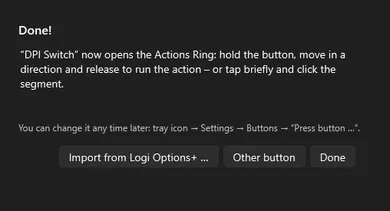
- When your mouse is connected, press the button that should open the Actions Ring – done.
The exe is not code-signed, so Windows SmartScreen may warn on the first start: More info → Run anyway.
Tested with the MX Vertical over Bluetooth. Other Logitech mice with HID++ 2.0 (Bluetooth, Bolt, Unifying, cable) should work – please report your results in an issue.
Deutsch: Erste öffentliche Version.
RingMouse.exean einen festen Ort kopieren (z.B.%LOCALAPPDATA%\Programs\RingMouse\) und starten, Logi Options+ beenden, dann die Maustaste drücken, die den Actions Ring öffnen soll. SmartScreen warnt beim ersten Start, weil die Datei nicht signiert ist: Weitere Informationen → Trotzdem ausführen. Details im deutschen README.- Copy
// READMETechnical details from the README
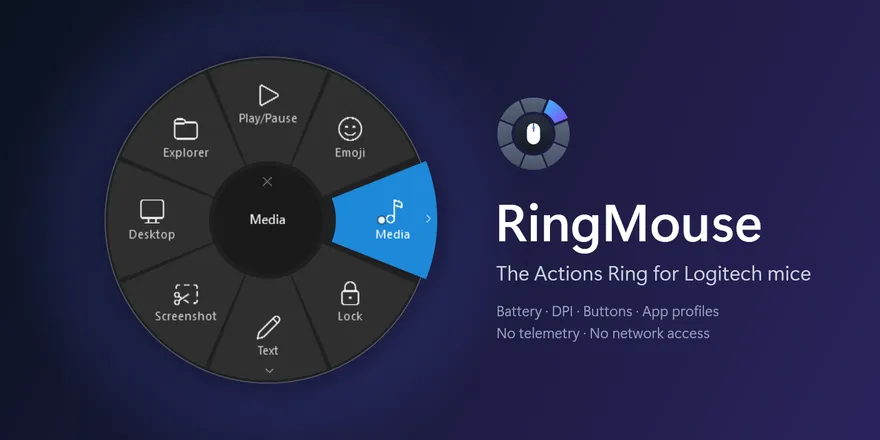
The Actions Ring of Logi Options+ as a small standalone app for Windows 11 – plus the mouse functions that go with it: the battery level in the tray with warnings, DPI, assignments for further buttons and per-app profiles for Logitech mice. RingMouse covers only these mouse functions; everything else Options+ does (keyboards, webcams, Flow, Smart Actions, lighting, firmware updates …) is not part of it. No driver, no admin rights, no telemetry, no network access.
- Talks HID++ 2.0 directly to the mouse (Bluetooth LE, USB cable, or a Bolt/Unifying receiver).
- Buttons are diverted via
REPROG_CONTROLS_V4(0x1B04). The available buttons (CIDs) are always queried from the device – nothing is hard-coded. - Diversions are re-applied after reconnects (0x1D4B), standby, unlocking, when the device reappears, and whenever the watchdog (every 30 s) finds a lost diversion.
- If signing out or shutting down is cancelled, RingMouse restarts itself after about 20 s.
- The configuration is a JSON file and is reloaded immediately when it changes.
- The user interface is available in English and German (follows the Windows display language, switchable).
Supported mice: Logitech mice with HID++ 2.0 – directly via Bluetooth, through a Bolt or Unifying receiver, or by
cable. Battery via 0x1004, 0x1001 or 0x1000, DPI via 0x2201 or 0x2202. So far tested with the MX Vertical over
Bluetooth; other models should work – feedback is welcome (see CONTRIBUTING.md).
Screenshots
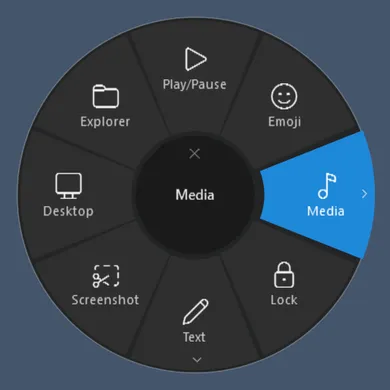
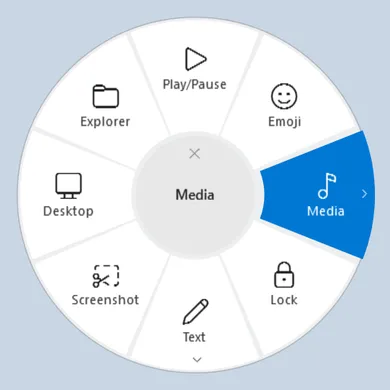
The ring – follows the Windows theme; size, colors and opacity are adjustable:
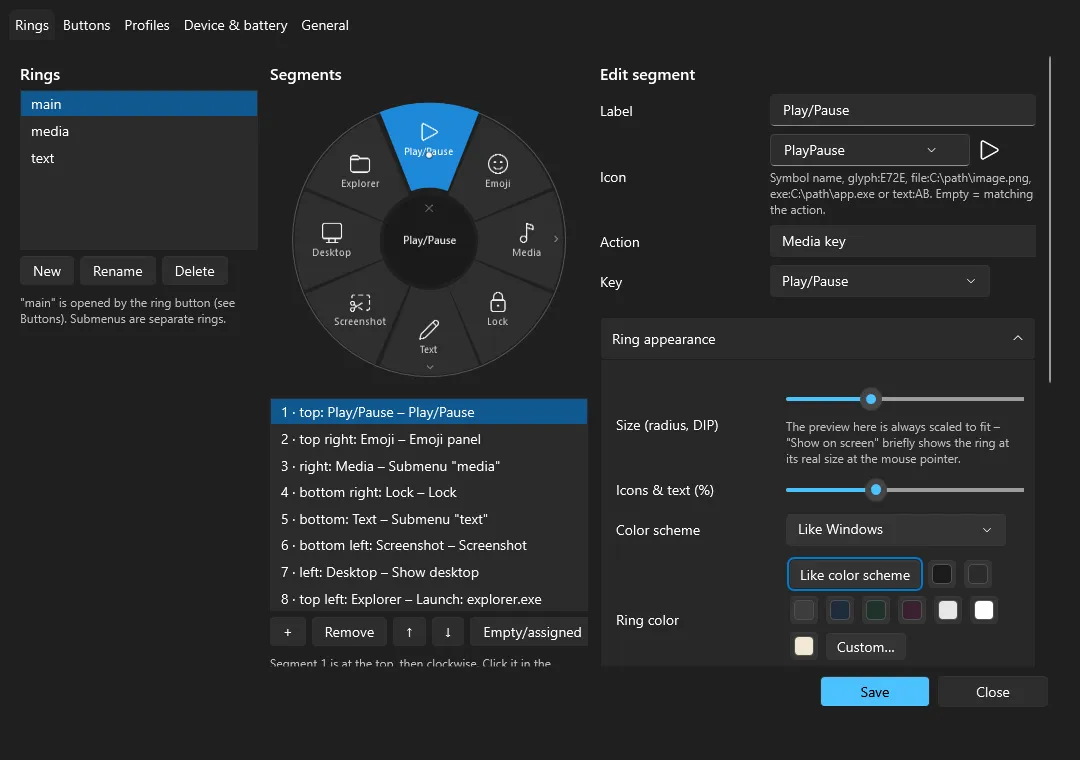
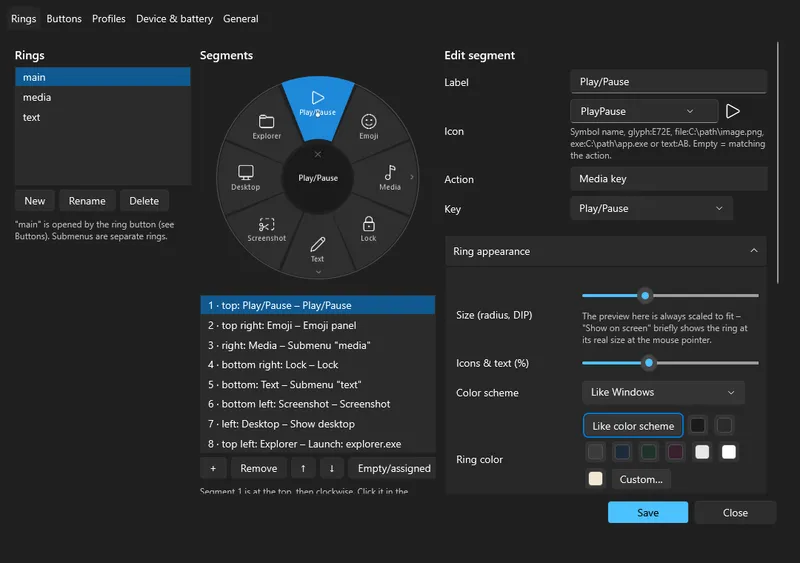
Settings – edit rings with a live preview; choose a button simply by pressing it:
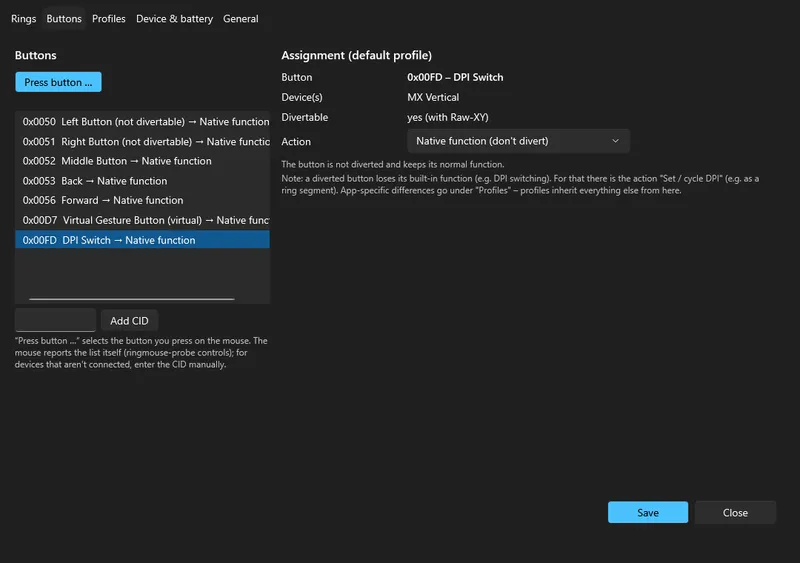
First start – press the button for the ring, or take over your setup from Logi Options+:
Contents
- Installation
- Switching from Logi Options+
- Using the ring
- Configuration · Action types · Icons · Profiles · Import & export
- Battery & tray
- Windows with admin rights (UIPI / uiAccess)
- ringmouse-probe
- Troubleshooting
- Privacy
- Building from source
- License
Installation
- Download
RingMouse.exefrom the latest release. It is a single self-contained file – no .NET installation needed. The release also lists SHA-256 checksums. - Copy it to a permanent folder, e.g.
%LOCALAPPDATA%\Programs\RingMouse\, and start it. The file is not code-signed, so Windows SmartScreen may warn on the first start (More info → Run anyway). - On the first start RingMouse creates
%APPDATA%\RingMouse\config.jsonwith a default ring: 8 slots plus the submenus Media and Text. As soon as your mouse is connected, the first-run setup asks for the ring button: simply press the button on your mouse that should open the ring (e.g. a thumb, gesture or DPI button). You can change it any time under Settings → Buttons → Press button …. - Tray icon → Settings → General → Start with Windows → Save.
Updating: quit RingMouse (tray → Exit, or RingMouse.exe --exit), replace the file, start it again.
Switching from Logi Options+
Options+ and RingMouse compete for the same buttons. Options+ re-applies its diversions on every app switch and turns the "analytics" reports for every click back on.
- Take over your Options+ setup first: the first-run setup offers Import from Logi Options+ … (also under Settings → General). It brings over the Actions Ring with its folders, the button assignments and the app profiles – see Import & export.
- Quit Options+: tray → Quit, then end
logioptionsplus_agent,logioptionsplusandLogiPluginServicein Task Manager. - Start RingMouse. The log (
%APPDATA%\RingMouse\logs\ringmouse-*.log) should contain a line like<mouse name> configured … diverted [0x…] Raw-XY [0x…]with the CID of your ring button. - If everything works and you used Options+ only for this mouse: uninstall Logi Options+. Remove the Logi Plugin Service as well – it is the basis of the Options+ Actions Ring. If you still need Options+ for other devices (e.g. a keyboard or webcam), keep it – but let only one of the two programs handle the mouse; running both side by side is not tested.
- If Options+ diverted buttons persistently,
ringmouse-probe controlsshowsPERSISTfor them.ringmouse-probe resetresets them. RingMouse also clears foreign diversions on unassigned buttons at startup by itself.
A common reason why the Options+ ring only opens sometimes: app profiles in Options+ (e.g. for Edge, Teams or Office) assign the ring button differently there, e.g. to "change pointer speed". RingMouse profiles inherit from the default and only differ where you explicitly say so.
Using the ring
Mode (ring.mode) | Behavior |
|---|---|
hybrid (default) | Tap briefly: the ring stays open, clicking a segment runs it. Hold: choose a direction, releasing runs it. |
hold | Hold the button, choose a direction, release to run |
tap | The ring stays open, a click runs the segment |
- Selection works by angle, not by hit-testing. Segment 1 is at the top, the others follow clockwise.
- Submenus while holding (push-through): hold the button and point towards a submenu – the segment is highlighted.
Pushing further out (beyond about 85 % of the radius) opens the submenu while the button stays pressed. Releasing over
the desired entry runs it. Disable with
ring.submenuPush: false. Releasing on the submenu segment opens it for clicking as before. - Feedback: the highlighted segment fades smoothly into the accent color and slides slightly outwards; while pushing
through it moves further out. If the pointer stands still while holding (Raw-XY), a dot shows the movement and the
normal mouse pointer is hidden meanwhile (
ring.hideCursor; it comes back when the ring closes, in tap mode, after 5 s without movement, and after a crash on the next start). Submenus zoom in and back out, a segment flashes briefly when it runs and the ring fades out. Segment borders have 5° hysteresis so the highlight does not flicker.ring.animation: falseturns the animations off. - Center (dead zone): releasing or clicking there cancels. In a submenu the center means "Back".
- Other ways to cancel: Esc, right-click, clicking outside the ring, pressing the button again (tap mode). Backspace goes back one level.
- If the button supports Raw-XY (e.g. the DPI button of the MX Vertical;
ringmouse-probe controlsshows it per button), the pointer stands still while holding and the direction comes straight from the sensor. Otherwise the ring follows the pointer movement. - Near the screen edge the ring is moved into the visible area; afterwards the pointer jumps back to where it was
(
ring.restoreCursor). - The overlay never takes the focus, so the action lands in the window you were just using.
- Light/dark and the accent color follow Windows. The ring is per-monitor DPI aware.
- Appearance (Settings → Rings → "Ring appearance", with live preview):
- Size (radius). "Show on screen" briefly shows the ring at its real size at the pointer, because the preview in the window is always scaled to fit.
- Icons & text in %. Words that are too long get smaller automatically instead of being cut off.
- Color scheme, ring color, highlight color and opacity. Text and shades are derived from the ring color.
- Pointer dot: size and color.
- Colors come from swatches or "Custom…" (Windows color dialog). In the config they are
"#RRGGBB"; empty means automatic.
- Latency: each time the ring opens the log notes
Ring visible xx ms after button press. Measured: about 24 ms from the HID event to the first frame.
Configuration
File: %APPDATA%\RingMouse\config.json. Next to it, config.schema.json gives editors such as VS Code completion and
validation.
- Comments (
//) and trailing commas are allowed. - Changes take effect immediately.
- If the file has an error, the last valid configuration stays active and a tray message names the line.
- The settings window writes the same file. Saving from the window drops comments.
{
  "$schema": "./config.schema.json",
  "general": {
    "language": "auto",                 // auto | english | german
    "autostart": "run",                 // off | run | task
    "warnIfOptionsPlusRunning": true,
    "disableAnalyticsReporting": true,  // turn off the mouse's Options+ "click tracking"
    "logLevel": "Information"
  },
  "ring": {
    "mode": "hybrid", "radius": 150, "deadzone": 26, "tapThresholdMs": 350, "submenuPush": true, "hideCursor": true,
    "animation": true, "restoreCursor": true, "useRawXY": "auto", "rawXYScale": 0.6,
    "theme": "system", "showLabels": true, "autoCloseSeconds": 8,
    "ringColor": null, "accentColor": null, "opacity": 100, "textScale": 100,   // null = automatic, otherwise "#RRGGBB"
    "pointerColor": null, "pointerSize": 9
  },
  "buttons": {                          // CID → action (CIDs: Settings → Buttons, or ringmouse-probe controls)
    "0x00FD": { "type": "ring", "ring": "main" }   // created by the first-run setup for the button you pressed
  },
  "rings": {
    "main": { "segments": [
      { "label": "Play/Pause",  "icon": "PlayPause",  "action": { "type": "media", "key": "playPause" } },
      { "label": "Emoji",       "icon": "Emoji",      "action": { "type": "system", "command": "emojiPanel" } },
      { "label": "Media",       "icon": "Music",      "action": { "type": "submenu", "ring": "media" } },
      { "label": "Lock",        "icon": "Lock",       "action": { "type": "system", "command": "lock" } },
      { "label": "Text",        "icon": "Edit",       "action": { "type": "submenu", "ring": "text" } },
      { "label": "Screenshot",  "icon": "Screenshot", "action": { "type": "screenshot" } },
      null,                                         // empty slot
      { "label": "Explorer",    "icon": "Folder",     "action": { "type": "launch", "target": "explorer.exe" } }
    ] },
    "text": { "title": "Text", "segments": [
      { "label": "Done",    "icon": "Check", "action": { "type": "snippet", "text": "Done {now:yyyy-MM-dd HH:mm}" } },
      { "label": "Regards", "icon": "Mail",  "action": { "type": "snippet", "text": "Best regards{newline}{user}" } }
    ] }
  },
  "profiles": [
    { "name": "Excel", "processes": ["excel.exe"],
      "buttons": { "0x0053": { "type": "keys", "keys": "Ctrl+Z" } },   // Back = Undo, only in Excel
      "rings":   { "main": "main-excel" } }                           // a separate ring in Excel
  ],
  "devices": {
    "*":           { },
    "MX Vertical": { "dpi": 1000 }      // re-applied after every reconnect
  },
  "battery": { "thresholds": [20, 10, 5], "notifyCharged": true, "pollMinutes": 10, "trayDevice": null },
  "debug": { "rawHidLog": false, "logRingLatency": true }
}
Action types
type | Fields | Notes |
|---|---|---|
ring | ring | only as a button assignment: opens a ring |
submenu | ring | only inside a ring: submenu in the same place |
keys | keys | Ctrl+Shift+S, Win+., Alt+F4, sequence Ctrl+K, Ctrl+C. German key names are accepted too (Strg, Entf, Pos1 …); character keys follow the active keyboard layout |
media | key | playPause, next, previous, stop, volumeUp, volumeDown, mute |
launch | target, arguments, workingDirectory, elevated | path, file, folder, URL, URI (ms-settings:, spotify:…), shell:AppsFolder\<AUMID> |
snippet | text, mode (type/paste) | placeholders {now:yyyy-MM-dd HH:mm}, {date}, {time}, {clipboard}, {user}, {computer}, {newline} |
powershell | script or command, arguments, hidden, usePwsh, elevated | commands run via -EncodedCommand (no quoting problems) |
screenshot | – | Snipping Tool selection (ms-screenclip:), fallback Win+Shift+S |
system | command | lock (LockWorkStation – Win+L cannot be sent via SendInput), emojiPanel, showDesktop, taskView, clipboardHistory, monitorOff, openSettings |
dpi | values | one value = set, several = cycle, e.g. [1000, 2000]. Replaces the DPI function of a diverted DPI button |
appKeys | process, keys, restoreFocus, launchIfNotRunning | hotkey for a specific app: briefly activate its window, send, return the focus |
mouse | button | left, right, middle, back, forward. As a button assignment the button is held down like the physical one |
sequence | steps | several actions, with { "type": "delay", "ms": 300 } in between |
native | – | native function (do not divert the button) |
none | – | disable the button |
Launching without admin rights: if RingMouse itself runs elevated, it still launches programs through the Explorer
shell without admin rights – unless "elevated": true is set.
Spotify without the Web API: Options+ controls Spotify through the Web API (internet and login). With appKeys it
works locally: desktop hotkeys sent to the Spotify window, e.g. Ctrl+S shuffle, Ctrl+R repeat, Alt+Shift+B like. A
playlist opens via launch with its spotify:playlist:… URI; you start playback yourself.
Icons
- Symbol names (Segoe Fluent Icons):
PlayPause Pause Stop Next Previous Volume VolumeUp VolumeDown Mute Emoji Music Album Lock Ticket Tag Screenshot Camera Photo Folder FolderOpen Explorer Shuffle Repeat RepeatOne Heart HeartFill Playlist List Clock Recent Timer Check CheckMark Save Refresh Sync Back Forward Cancel Settings Globe Web Terminal PowerShell Keyboard Mouse Mail Copy Paste Cut Undo Redo Search Calendar Star Link Edit Delete Add Phone People Microphone Video Monitor Desktop TaskView Power Brightness Home Pin Flag Warning Info Code Dpi Speed Headphones Chat Print Share Download Upload Cloud Bluetooth Battery Help Zoom FullScreen Clipboard Laptop Shield Document ChevronRight - Custom icons:
glyph:E72Efor any code pointfile:C:\path\image.pngfor a PNG, ICO or JPG fileexe:C:\path\app.exefor the program icontext:ABfor up to 3 characters
- Without an icon: RingMouse picks one that matches the action. For
launchit is the program's icon.
Profiles
- The first matching profile wins. What counts is the process name of the foreground window, e.g.
excel.exe; the wildcards*and?are allowed. - A profile only overrides what it contains: single
buttonsand/orrings(ring name → another ring). - Everything else comes from the default.
- Buttons that are only assigned in a profile are still diverted everywhere. In other apps RingMouse emulates their native function (back/forward/middle).
Import & export
- Export: Settings → General → Export … saves the configuration as a
.jsonfile, e.g. for another computer. - Import: Import … accepts such a file or an Actions Ring preset exported from Logi Options+ (
.lp5). A preview lists what will be taken over and what not; you choose the parts: rings, button assignments, app profiles, device settings and – for RingMouse files – general settings. Selected parts replace rings, profiles and device entries with the same name and the same buttons; everything else stays. A backup of the current configuration is created first. - From Logi Options+: Import from Logi Options+ … (also offered by the first-run setup) reads the local Options+
data: the Actions Ring with its folders (from the Logi Plugin Service, including per-app rings) and the button
assignments and app profiles of the mouse you choose (from the Options+ settings database, read from a copy).
- Taken over: keyboard shortcuts, text snippets, program/file/URL launches, media and Windows functions, macros made of
these, and the Spotify plugin actions (as local Spotify hotkeys; playlists via their
spotify:URI). - Not transferable: actions of other plugins (e.g. Excel, Teams, Photoshop), dial adjustments, gestures, Easy-Switch, macOS shortcuts and "change pointer speed". The report names each one.
- Only profiles and applications are read – no account, analytics or other Options+ data.
- Taken over: keyboard shortcuts, text snippets, program/file/URL launches, media and Windows functions, macros made of
these, and the Spotify plugin actions (as local Spotify hotkeys; playlists via their
RingMouse.exe --import-report <file>writes what an import from the installed Options+ would produce, without changing anything – handy for bug reports.
Battery & tray
- Tray icon: the battery level as a number inside a ring. The ring identifies RingMouse (to tell it apart from other
percentage icons, e.g. MagicPods) and shows the level as an arc starting at 12 o'clock.
- white or black to match the taskbar, orange below 20 %, red below 10 %
- green while charging or on cable, a check mark at 100 %
- gray if the mouse cannot be reached (last known level)
- "?" without a value
- Tooltip: e.g.
MX Vertical: 64 % · discharging · Bluetooth LE. While the mouse sleeps it shows the last known level with its time. - Warnings at 20, 10 and 5 %: each threshold once per discharge cycle. It re-arms when charging or when the level rises 5 points above it. Plus "charging complete". On Windows 11 they appear as normal notifications.
- Source:
0x1004 UNIFIED_BATTERY, otherwise0x1001 BATTERY_VOLTAGEwith a Li-ion curve that can be adjusted viabattery.voltageCurve, otherwise0x1000. The MX Vertical reports level steps via0x1000. - Updates: via events from the mouse plus a query every
pollMinutes. The last level is kept in%APPDATA%\RingMouse\state.json.
Windows with admin rights (UIPI / uiAccess)
Windows does not let a normal process send input to windows with higher rights (UIPI), and low-level hooks do not see clicks there either. RingMouse detects and logs this and shows a message once per program. The ring still opens, but only works in hold mode in that case.
| Setup | Solution |
|---|---|
| Your account is an administrator (UAC with "Yes") | Autostart "scheduled task with highest privileges" in the settings. The task runs with normal priority and without a time limit. |
| Standard user + separate admin account | "Highest privileges" does not help, because admin windows run under the other account. The solution is the uiAccess installation. |
uiAccess installation: the exe is signed and placed in C:\Program Files\RingMouse. It then runs without admin
rights but may still operate admin windows. Use RingMouse-uiAccess.zip from the release (or build it yourself with
.\build.ps1 -Target Publish), then run as administrator:
Start-Process powershell -Verb RunAs -ArgumentList '-ExecutionPolicy Bypass -File "<path>\tools\install-uiaccess.ps1"'The script creates a local code-signing certificate that cannot be exported and is only trusted on this computer.
Alternatively pass one from your own PKI with -Thumbprint. It then copies and signs the app. Afterwards start RingMouse
from C:\Program Files\RingMouse and enable Start with Windows. Settings → General → Info then shows "uiAccess yes".
ringmouse-probe
A console diagnostic tool. It needs no admin rights and only reads, except for live and reset.
ringmouse-probe list                     all Logitech HID collections: usage page/usage, report IDs, HID++, BLE/USB/receiver
ringmouse-probe info | features | controls | battery | dpi [--set N] | dump
ringmouse-probe live --cid 0x00FD [--rawxy] | --all     divert a button, show raw + decoded events (Ctrl+C restores)
ringmouse-probe monitor                  listen only (also shows other software such as Options+)
ringmouse-probe watch [--cid 0x00FD] [--takeover]       DeviceService as in the app: reconnect/standby/watchdog live
ringmouse-probe reset [--cid ..]         diversions/remaps/analytics back to native
Options: --device <n|PID>  --index <1-6>  --swid <1-15>  --raw  --record frames.jsonl  --duration <s>  --timeout <ms>
Example – findings for an MX Vertical over Bluetooth:
- Connected via BLE, PID
B020, HID++ 4.5. - The HID++ collection is
COL02with usage page 0xFF43 / usage 0x0202. Over BLE there are only long reports0x11, not0xFF00. - Buttons:
0x0050and0x0051cannot be diverted.0x0052,0x0053,0x0056and0x00FD(DPI switch) can, each with Raw-XY.0x00D7is a virtual button. - Battery via
0x1000, DPI 400–4000 in steps of 100.
Troubleshooting
| Problem | Cause / solution |
|---|---|
| The ring does not open | Is a ring button assigned (Settings → Buttons)? Is Options+ running? See the tray tooltip or the log: look for diverted [0x…] with the button's CID. Cross-check with ringmouse-probe live --cid <CID> |
| A button does nothing after a crash | The temporary diversion is still active. Switch the mouse off and on, or run ringmouse-probe reset. Restarting RingMouse sets it again as well |
| After waking up, the first press takes a moment | BLE reconnects. RingMouse configures the mouse after 0x1D4B, after standby ends (+2/+6/+15 s) and via the watchdog |
| Battery shows "?" or gray | The mouse sleeps and has not reported a value yet. The tooltip shows the last level |
| An action does not reach an admin window | UIPI, see uiAccess |
| A text snippet arrives garbled in RDP/Citrix | Use "mode": "paste" |
App hotkeys (appKeys) have no effect | The app must run with a window. If it is only minimized to the tray, it is opened briefly. Spotify hotkeys cannot be made global |
config.json is broken | The previous configuration stays active. The tray message names the line; with config.schema.json your editor shows the error |
| Autostart "task" does not help | The higher rights only apply to admin accounts, see above. The task also starts RingMouse on unlock if it is not running (tasks created by older versions: set them again once in the settings – UAC asks for an admin account). The Run entry only starts at sign-in |
| The ring stops reacting after standby/Bluetooth dropouts | A separate watchdog thread detects a stuck device service after 45 s, cancels the step and restarts it if needed. The log then shows Device management stuck for … s at "<step>", every 10 min a line about missing Logitech devices and every 30 min a status line |
| RingMouse does not respond (Windows says "not responding") | The UI watchdog writes UI thread not responding for … (step: …) to the log – please report that line |
Privacy
RingMouse has no telemetry and makes no network connections. Everything stays on your computer:
%APPDATA%\RingMouse\–config.json,config.schema.json,state.json(last battery levels),logs\%LOCALAPPDATA%\RingMouse\startup.log– a small start-up trace
Logs and ringmouse-probe dump recordings contain technical device data such as the unit ID of your mouse. Check them
before you share them in a bug report.
Building from source
.\build.ps1                       # build + tests + publish (needs the .NET 10 SDK)
# Result:
#   publish\RingMouse\RingMouse.exe          – the app (single file, self-contained)
#   publish\probe\ringmouse-probe.exe        – diagnostic tool
#   publish\RingMouse-uiAccess\              – variant for admin windows (see above)
src/RingMouse.HidPlusPlus HID++ protocol (framing, matching, features 0x0000/0001/0003/0005/1000/1001/1004/1B04/1D4B/2201/2202,
receiver registers) + a lean Win32 HID transport (hid.dll/cfgmgr32, overlapped I/O). No packages.
src/RingMouse.Core configuration (model, JSON, schema, validation, hot reload), ring geometry + state machine,
profiles, battery thresholds, keyboard shortcut parser, text snippets, localization
src/RingMouse.Platform Win32: SendInput, low-level hooks, foreground/elevation, launching without admin rights,
clipboard, autostart (Run/task), monitors/DPI, theme
src/RingMouse.Device DeviceService: discovery, life cycle, diversion, button detection, watchdog, battery, DPI, receivers
src/RingMouse.Actions action engine (own STA thread)
src/RingMouse.App WPF tray app: ring overlay, tray, settings, first-run setup, logging (Serilog)
tools/RingMouse.Probe ringmouse-probe
tests/… unit tests: protocol (incl. replayed real MX Vertical frames), core, DeviceService simulator
.\build.ps1 [-Target Build|Test|Publish|All]- .NET 10 (LTS until 11/2028), self-contained, win-x64. The SDK's CLI telemetry is turned off in the script.
RingMouse.exe --exitquits a running instance cleanly (like tray → Exit; diversions are reset), e.g. before an update. Exit code 0 = quit or was not running.RingMouse.exe --render-ui <folder>renders the ring, tray icons and settings pages as PNG files, without a mouse – in English and German, plus the logo and the app icon (ringmouse.ico). The pictures indocs/imagescome from it.RingMouse.exe --selftest --quietchecks the real path: device configured, ring visible, focus kept, clean exit. The result is in the log. Actions only run as a dry run (nothing is executed); don't move the mouse meanwhile.- Manual test checklist for contributors: docs/testing.md.
- Dependencies: Serilog (Apache-2.0), H.NotifyIcon (MIT), xUnit (Apache-2.0). Solaar was used as a protocol reference only; no GPL code was copied.
License
MIT with "Commons Clause": RingMouse may be used free of charge – also at work –, modified and passed on free of charge. Selling RingMouse, or offering paid products or services whose value derives substantially from it, is not permitted. For contributions see CONTRIBUTING.md.
Logitech, Logi Options+ and MX Vertical are trademarks of Logitech. RingMouse is an independent project and is not affiliated with Logitech.